DST (Daylight Saving Time) and GMT/World Time Watches: How to Adjust and Avoid Common Mistakes
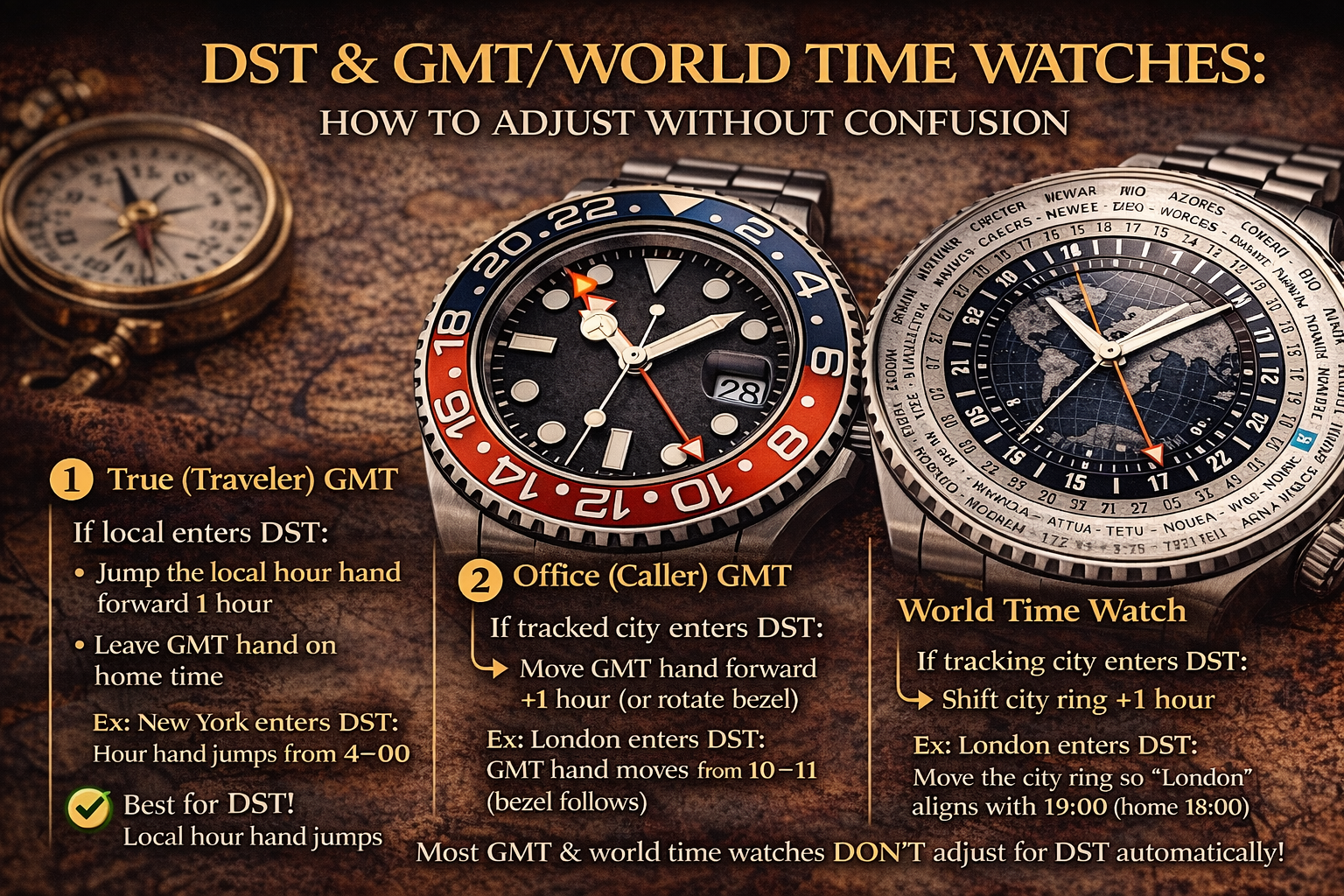 Daylight Saving Time (DST) is the #1 reason GMT and world time watches feel “wrong” by exactly one hour. The watch may be set correctly, but your reference city may have switched to DST while another city didn’t—or your watch can’t automatically account for DST at all.
If you want the basics of GMT vs world time first:
GMT vs World Time Explained: Differences, How They Work, and Which You Need
Quick Answer
-
Most GMT and world time watches track standard time and do not automatically adjust for DST.
-
When DST starts/ends, you usually fix it by adjusting:
-
the local hour hand (Traveler GMT), or
-
the GMT hand / bezel offset (Office GMT), or
-
the city ring alignment (World time)
-
What DST Does to GMT and World Time Watches
DST changes local time by +1 hour (in many regions), but not all countries use DST, and they don’t switch on the same dates.
So a world time city ring might show:
-
London / New York “shifted” compared to UTC
-
while Tokyo stays unchanged
That’s why your world time can look wrong even when the watch is running perfectly.
If your accuracy suddenly seems off, confirm it’s not just DST confusion:
Are Automatic Watches Accurate? Real-World Tolerances, Why They Drift & How to Improve Accuracy
How to Adjust a True (Traveler) GMT for DST
Traveler GMT is usually the easiest for DST.
If your local city enters DST:
-
Jump the local hour hand forward 1 hour
-
Leave the GMT hand on home time (unless home also changed)
If you’re unsure which GMT type you have, read:
True GMT vs Office GMT: Differences, How to Tell, and How to Set Each One
How to Adjust an Office (Caller) GMT for DST
Office GMT typically means your local time is set with the main hands, and the GMT hand tracks your second zone.
If your tracked city enters DST (but your local doesn’t):
-
Move the GMT hand by +1 hour (or change bezel alignment by 1 hour)
If your local enters DST:
-
Reset the main time by +1 hour (and keep the GMT hand consistent to the tracked city’s new time)
How to Adjust a World Time Watch for DST
World time is the trickiest because the city ring assumes a fixed offset system.
Typical approach:
-
If your reference city enters DST, shift the city ring or 24-hour ring by 1 hour to match real-world time.
Setting method guide:
How to Set a World Time Watch (Step-by-Step)
Important: World time watches usually cannot show “some cities DST, some not” perfectly at the same moment. You’re choosing the reference alignment that matches what you care about most.
Using a GMT Bezel During DST (Third Time Zone)
If you track a third time zone via rotating bezel, DST can add an extra one-hour offset.
Guide:
How to Use a GMT Bezel to Track a Third Time Zone
Practical tip:
-
If City #3 enters DST, your bezel offset for that city changes by +1 hour.
DST “Danger Zone” Warning (Date and Setting Safety)
DST adjustments often involve moving the hour hand around midnight, which can affect the date.
Use safe rules here:
How to Set an Automatic Watch Safely
Common DST Mistakes (Avoid These)
-
Assuming the watch “should know DST”
-
Adjusting the date at unsafe hours while rushing
-
Forgetting that some time zones don’t change at the same time (or at all)
-
Mixing up home vs local time and shifting the wrong hand
If your watch stops while traveling, that’s power reserve, not DST:
Do Automatic Watches Stop If Not Worn? Power Reserve, Why It Happens & Easy Fixes
FAQ: DST and GMT/World Time Watches
Do GMT watches automatically adjust for DST?
Most do not. You adjust manually.
Why does my world time show one city wrong by an hour?
DST differences between cities cause misalignment. World time rings assume fixed offsets.
What’s the easiest watch type for DST?
Traveler GMT is usually easiest because the local hour hand jumps by 1 hour cleanly.
Does DST affect watch accuracy?
No—DST is a time zone change, not timekeeping error.